We provide premium BTCPAY VPS Servers!
  • Contact
  • View Cart (0)
  • Client Area
  • HelpDesk
Dream Lab Network Solutions LLC logo
Knowledgebase
Support
  • Domains
    Register Domain
    Your very own website address
    Transfer Domain
    Move your domain to Dream Lab Network Solutions LLC

    Hundreds of customer's around the world trust Dream Lab Network Solutions LLC to manage their domain. We provide freedom and control including full access & the ability to move/sell your domains.

  • Services
    Web Hosting Plans
    Premium cPanel web hosting

    We provide a wide range of services for your business including Web Hosting, Dedicated Servers, VPNs & more.

  • Extras
    SSL Certificates
    Encrypt your website using https
    Website Builder
    An easy to create website builder tool
    Website Backup
    Protect your website with frequent backups
    Website Security
    Keep your website safe & secure
    Email Security
    Secure your incoming and outgoing email
    SEO Tools
    SEO report with optimization steps
    Professional Email
    Powerful email and productivity
    XOVI NOW
    SEO optimization & reporting
    NordVPN
    Protect your online privacy

    Enhance your website with these extras including our website backup & security services.

  • Company
    Company
    Learn more about Dream Lab Network Solutions LLC
    Why Choose Us
    The reasons why to choose us
    Announcements
    Get up to date with the latest news
    Downloads
    View our collection of downloads

    Learn more about what makes Dream Lab Network Solutions LLC the best choice for web hosting services.

  • Support
    Contact Form
    Contact our pre-sales department
    Submit Ticket
    Contact our support via ticket
    Knowledgebase
    View our vast documentation

    If you have a pre-sale question or issue with your website we are here to help.

  • Order

Knowledgebase

Portal Home > Knowledgebase > WordPress > How to remove your post in WordPress?

  Categories

8
BTCPay Server
9
Cloudflare (cPanel)
10
CloudLinux (cPanel)
28
cPanel - Control Panel
11
Databases
48
DirectAdmin
6
DNS - Nameservers
10
Domain Management
17
Email
9
FTP
6
Installing a Control Panel
8
Mail Filters & SPAM
11
Mobile
3
Others
7
PayPal
47
Plesk
10
Security
61
SiteWorx (Control Panel)
76
Softaculous
19
SolusVM
5
SSL
19
Virtualizor
18
WHM
17
WordPress

  Categories

  Support

  My Support Tickets   Announcements   Knowledgebase   Downloads   Network Status   Open Ticket

How to remove your post in WordPress? Print

  • 0

You can remove your published or draft post in WordPress.


1. Login to your WordPress admin dashboard.


2. Under the dashboard menu, hover your mouse on Posts and then click on All Posts.


3. Choose the post you wish to remove, and the Trash option will appear, Click on it.
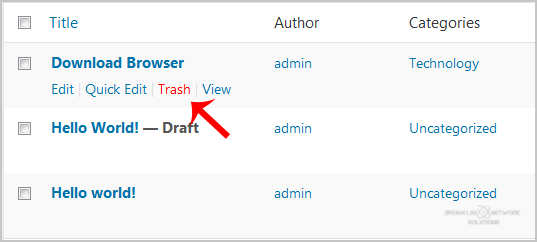

You will get a success message as 1 post moved to the Trash.


Was this answer helpful?

Related Articles

How to access the WordPress admin account? WordPress is a CMS software with an easy to access admin account and a simple to manage blog... How to Install a Plugin in WordPress? You can install a plugin in WordPress in several ways. The best way to install a plugin is to use... How to Manually Install a Plugin in WordPress? The automatic installation of a plugin is easy, and you can also install on manually. It will... How to Deactivate and Delete a Plugin in WordPress? If your plugin is not in use or you wish to deactivate it, you can do this from the WordPress... How to Forcefully Update a Plugin in WordPress? If your WordPress plugin is not working correctly or you want to re-install it even when it is...
« Back

  Support

  My Support Tickets   Announcements   Knowledgebase   Downloads   Network Status   Open Ticket

Loading...
Loading...

Generate Password

Please enter a number between 8 and 64 for the password length
Services
  • Web Hosting Plans
  • SSL Certificates
  • Weebly Site Builder
  • Website Backup
  • Websiote Security
  • Email Security
  • SEO Tools
  • Professional Emails
  • XOVI NOW
  • Nord VPN
  • Site Monitoring
Domains
  • Register Domain
  • Transfer Domain
Company
  • Company
  • Why Choose Us
  • Announcements
  • Downloads
Support
  • Contact Form
  • Submit Ticket
  • Knowledgebase
About Dream Lab Network Solutions LLC
Dream Lab Network Solutions LLC provide premium web hosting, domain registration & security services to businesses around the world. more
PO BOX 646, East Hanover, NJ 07936
support@dreamlabnetwork.solutions
Follow Dream Lab Network Solutions LLC
Dream Lab Network Solutions LLC Facebook
Dream Lab Network Solutions LLC Telegram
Donate
Server Locations
Locations
Dream Lab Network Solutions LLC © 2025 | All rights reserved
  • Terms Of Service
  • Acceptable Usage Policy
  • Privacy Policy
Dream Lab Network Solutions LLC Cards
 
Dream Lab Network Solutions LLC Facebook
Dream Lab Network Solutions LLC Telegram