1. Log into your SiteWorx account. (e.g. www.example.com:2443/siteworx/ )
2. Under SiteWorx Menu, click the Backups menu item if it is not already open.
3. Click the Management menu item.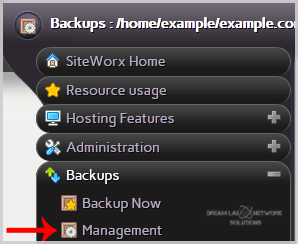
4. Click on the "Restore account from backup" button and select the Use a file already on the server option from the dropdown menu.
5. Click on the Continue button.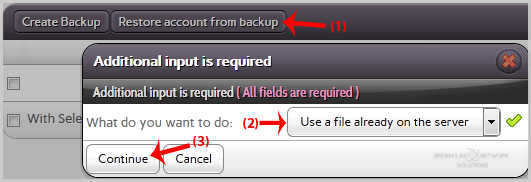
6. In the confirmation window, select partial backup from the drop-down menu and then click on the Restore button.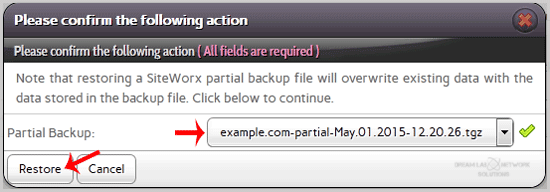
Categories
8
BTCPay Server
9 Cloudflare (cPanel)
10 CloudLinux (cPanel)
28 cPanel - Control Panel
11 Databases
48 DirectAdmin
6 DNS - Nameservers
10 Domain Management
17 Email
9 FTP
6 Installing a Control Panel
8 Mail Filters & SPAM
11 Mobile
3 Others
7 PayPal
47 Plesk
10 Security
61 SiteWorx (Control Panel)
76 Softaculous
19 SolusVM
5 SSL
19 Virtualizor
18 WHM
17 WordPress
Categories
How to Restore Partial backup in SiteWorx? Print
- 0